
Compare
aidnn vs Tableau, Power BI and Looker
Keep your data stack. Hand the backlog to agents.
Every answer comes with its receipt in aidnn or in the apps your teams already use.
At a glance
aidnn
Tableau
Power BI
Looker
Follow-ups without a new report
Ask in the view you are in
Modeled metrics only
Copilot capacity and setup
Within one Explore
New workflows without development
Agents build it
Extensions or flows
Fabric and Power Apps
LookML and extensions
Verified answers with lineage
Verified, with lineage
Author review
Certified models
Governed definitions
Build once, deploy anywhere
One release, any app
Embedded dashboards
Embedded reports
Semantic layer API
Saved, shareable what-if scenarios
Save, share and discuss
Parameters, no saved plans
Writeback setup and storage
Actions and custom storage
Go beyond what traditional BI tools can do.
Tableau, Power BI, and Looker help teams explore and visualize data. aidnn goes further, using AI agents to build, analyze, and act on data while keeping your team in control. See how five common BI workflows compare.
Task
aidnn by Isotopes AI
Tableau
Why it matters to your team
Answer the follow-up
Execs ask in their workflow. aidnn answers using connected data and evidence.
Pulse and Tableau agents answer questions on pre-modeled metrics. New questions often require the dashboard author.
The question gets answered in the meeting. Nobody files a ticket.
Ship a new workflow
Agents build workflows on existing data, in notebooks your team can review, branch, and release.
New workflows mean new dashboards, extensions or Tableau Next flows, built and maintained by your team.
Your team reviews and releases. Agents do the build.
Prove the answer is right
Every data app is verified before release, with answers traceable to source data.
Trust rests on the data source and the report author. AI answers are not tested before people rely on them.
You can sign off on an AI answer, because you can see where it came from.
Serve it everywhere
Use it in aidnn or across web, mobile, and agent apps, with consistent data and rules.
Embedded analytics puts dashboards inside other apps. Reusing the logic in a mobile app or agent means rebuilding it.
One build, one fix, every surface. Answers never drift apart.
Save and share the scenario
Adjust assumptions, save and share scenarios, comment, and ask follow-up questions on any plan.
Parameters enable what-if analysis. Saving, sharing, and commenting on separate scenarios requires an extension or Tableau Next.
The plan stays live after the meeting. Everyone works from the same saved version, with the discussion beside it.
Task
aidnn by Isotopes AI
Power BI
Why it matters to your team
Answer the follow-up
The exec asks in the view they are already in. aidnn answers from connected records and shows the evidence.
Copilot can summarize and answer questions on a report, once capacity and admin settings are in place. Answers stay within the semantic model.
The question gets answered in the meeting. Nobody files a ticket.
Ship a new workflow
Agents build the workflow on the data you already have, in a notebook your team can review, branch and release.
Writeback and planning workflows combine Fabric, Power Apps or Power Automate, plus storage and access rules.
Your team reviews and releases. Agents do the build.
Prove the answer is right
Each data app is checked before release. Every answer carries its lineage back to the rows behind it.
Certified semantic models help. Copilot answers themselves are not checked before release.
You can sign off on an AI answer, because you can see where it came from.
Serve it everywhere
Use it in aidnn, or call it from your own web, mobile and agent apps. Every surface gets the same numbers and rules.
Power BI Embedded shows reports in other apps. The logic stays inside the model and the report.
One build, one fix, every surface. Answers never drift apart.
Save and share the scenario
Users change assumptions, save each scenario, choose who sees it, and discuss it in comments. Follow-up questions work on every saved plan.
What-if parameters are built in. Saved plans need writeback through Fabric or Power Apps, plus storage and rules for who can see each one.
The plan stays live after the meeting. Everyone works from the same saved version, with the discussion beside it.
Task
aidnn by Isotopes AI
Looker
Why it matters to your team
Answer the follow-up
The exec asks in the view they are already in. aidnn answers from connected records and shows the evidence.
Gemini and Conversational Analytics answer within a governed Explore. Questions across Explores need modeling work.
The question gets answered in the meeting. Nobody files a ticket.
Ship a new workflow
Agents build the workflow on the data you already have, in a notebook your team can review, branch and release.
New workflows mean LookML changes, actions or extensions, and a developer to build them.
Your team reviews and releases. Agents do the build.
Prove the answer is right
Each data app is checked before release. Every answer carries its lineage back to the rows behind it.
LookML keeps definitions consistent. Individual AI answers carry no verification status or row-level lineage.
You can sign off on an AI answer, because you can see where it came from.
Serve it everywhere
Use it in aidnn, or call it from your own web, mobile and agent apps. Every surface gets the same numbers and rules.
The semantic layer and API let other apps reuse definitions. Lineage on each answer, follow-ups and agent tasks are left to your team.
One build, one fix, every surface. Answers never drift apart.
Save and share the scenario
Users change assumptions, save each scenario, choose who sees it, and discuss it in comments. Follow-up questions work on every saved plan.
LookML parameters support what-if inputs. Saving plans needs actions or extensions, custom storage and access rules.
The plan stays live after the meeting. Everyone works from the same saved version, with the discussion beside it.
See the difference in action
Illustrative views built in aidnn, with what the same job takes in each BI tool.
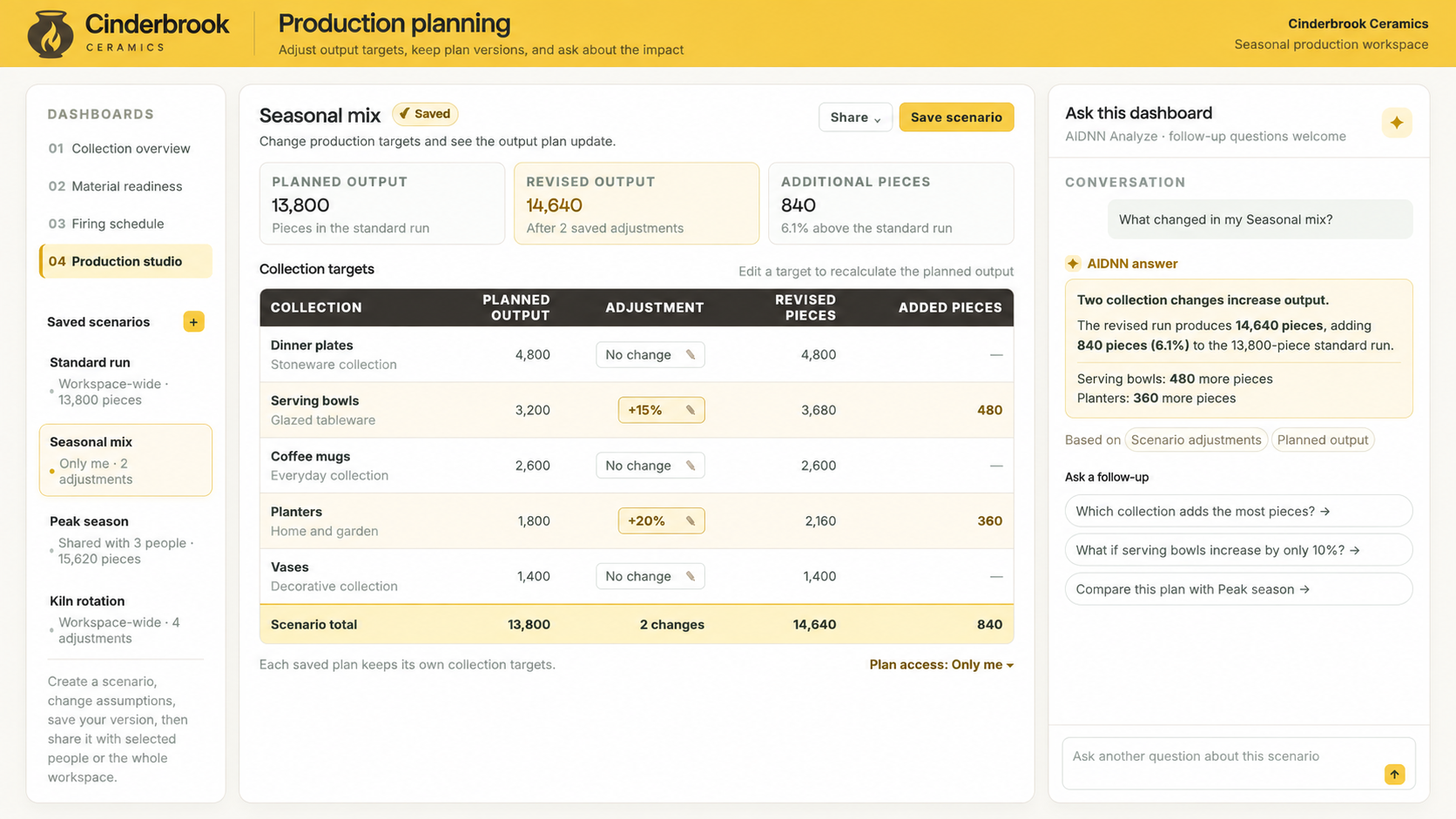
01 Ask, save, and share
Turn what-if questions into actionable plans
Test assumptions, save and share scenarios, and collaborate in real time. Every answer is traceable to its source data.
How other BI tools compare
Tableau. Parameters handle what-ifs. Keeping separate saved plans needs an extension.
Power BI. Copilot answers inside the report. Saved plans need writeback, storage and access rules.
Looker. Gemini answers inside one Explore. Saved plans need actions and custom storage.
Try the demoAsk, save and share the scenario
Cinderbrook Ceramics, illustrative production workspace
From request to released workflow
Product view to come
02 Build and deploy workflows
Agents build. Your team reviews and releases.
Agents build workflows using your existing data. Your team can review, refine, and approve each workflow before deployment.
How other BI tools compare
Tableau. Your team builds and maintains the extensions or flows.
Power BI. Planning apps combine Fabric, Power Apps, storage and access rules.
Looker. A developer writes the LookML, actions or extension.
Try the demo03 Verify every answer
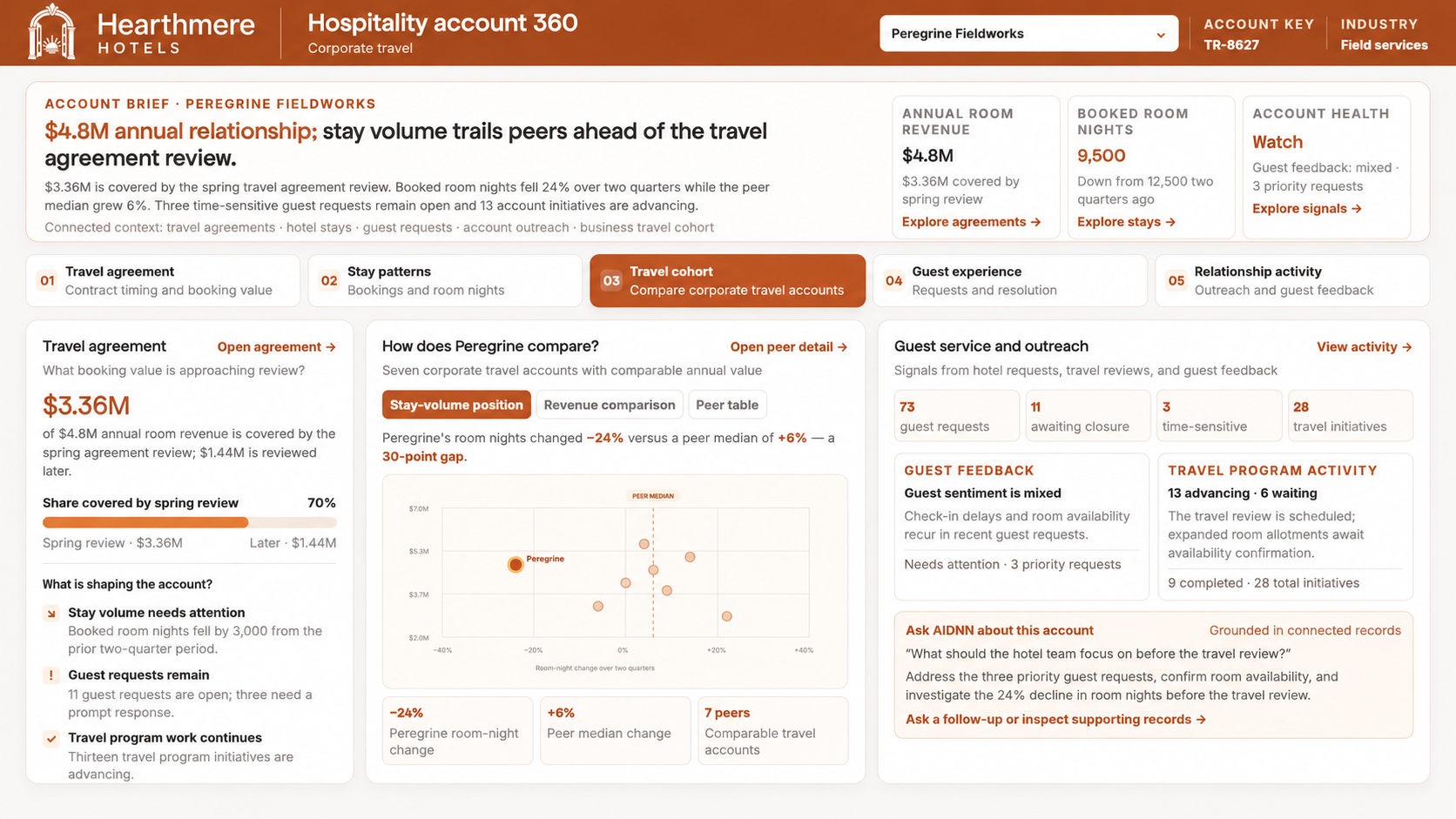
Every answer comes with its receipt
Every data app is verified before release, with answers traceable to the underlying records. Your team can make decisions with confidence.
How other BI tools compare
Tableau. Trust sits with whoever built the data source.
Power BI. Certified models help. The AI answer itself isn't tested.
Looker. Definitions are governed. Answers carry no row-level lineage.
Try the demoGrounded in connected records
Hearthmere Hotels, illustrative account view
Same release. Same evidence. Their app, their design.
Avenlo Outfitters, illustrative associate dashboard and store app
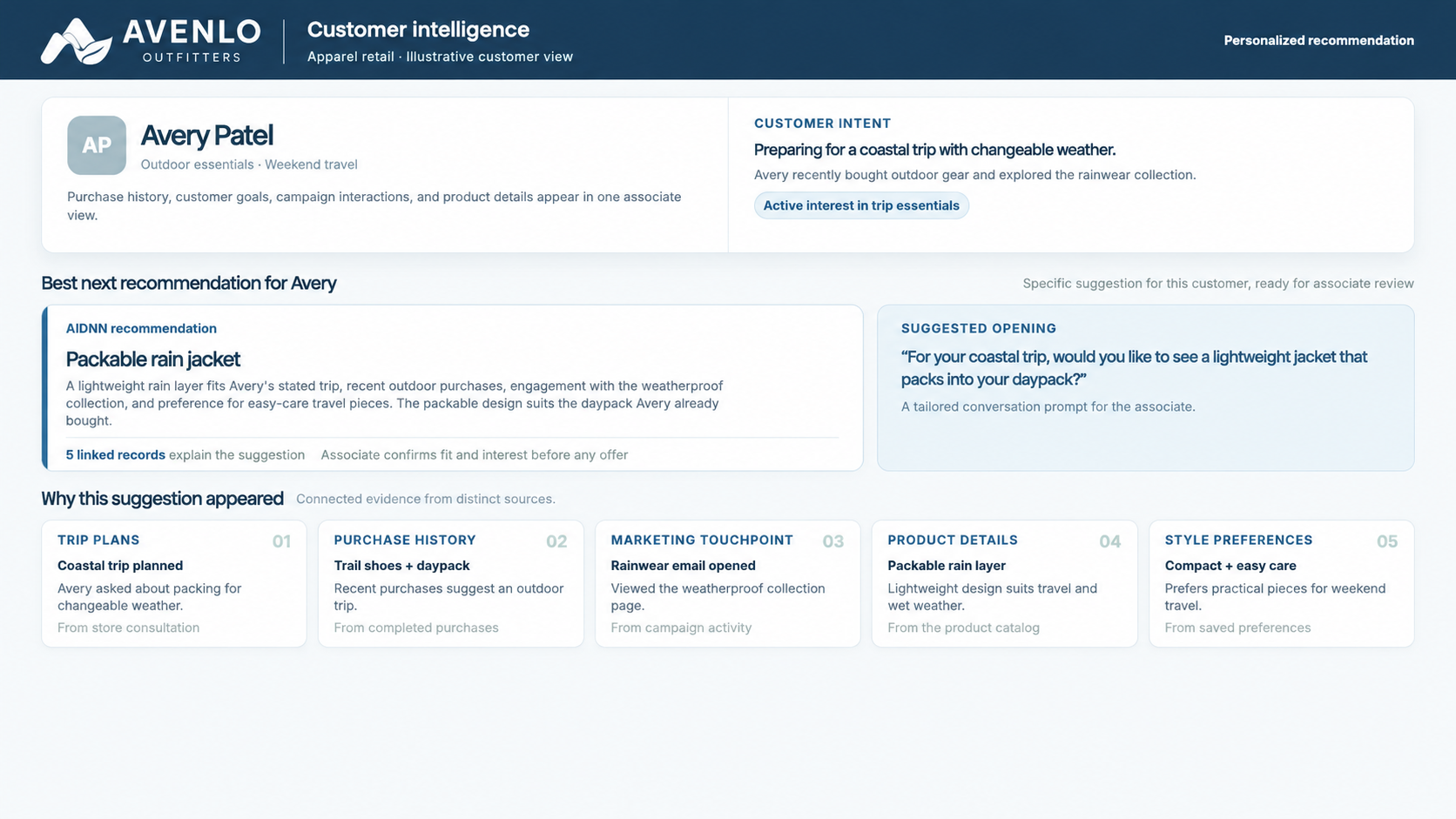
In aidnn
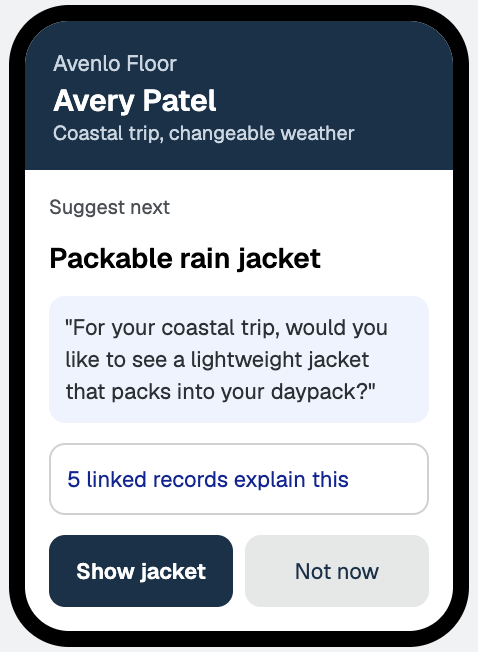
In the retailer's own app
04 Deploy across apps
Build once with aidnn. Deploy anywhere.
Use aidnn workflows across your web, mobile, and agent applications. Update once, and every connected app benefits from the same logic, data, and evidence.
How other BI tools compare
Tableau. Dashboards embed. The logic stays behind them.
Power BI. Reports embed. Reuse anywhere else means rebuilding.
Looker. The API shares definitions. Lineage and agent tasks are yours to build.
Try the demoYour dashboards stay. The queue does not.
aidnn runs on the warehouse and systems you already have, raw data included. Your dashboards stay. The follow-ups, new workflows and app requests stop piling up.
Your data never leaves your environment. Everything your agents build and learn stays with you.
Where people and apps use the work
aidnn dashboards
Tableau, Power BI, Looker
Your web and mobile apps
Agents, Excel, APIs
Answer
Ship
Prove
Serve
Save
Snowflake, Databricks, BigQuery
SAP, Oracle, Workday
Salesforce and other apps
Your data, where it already lives
surfaced in the first four weeks
A Fortune 100 enterprise fed aidnn raw planning, actuals and purchase order data, with no harmonization first. aidnn reconciled it across 1,400+ cost centers and found uncaptured vendor rebates and trapped budget.
A six-week manual reconciliation became a week-long automated one, and a quarterly reforecast became monthly.
Questions data leaders ask
Do we have to replace Tableau, Power BI or Looker?
No. Keep the dashboards your business relies on. aidnn takes on the follow-ups, new workflows and app requests that would otherwise land in your team's queue.
Will agents replace my data team?
Agents take the repetitive build work. Your team sets the rules, reviews what agents build, and decides what gets released. The same shift made software engineers more productive, and more in demand.
How do you check an AI answer before people rely on it?
Every data app is verified before release, and each answer carries its lineage back to the rows behind it. [Add specifics on tests, sign-off and audit trail]
Does our data need to be modernized first?
No. aidnn works on raw data in the platform you already chose, and learns the meaning already encoded in your pipelines. It can also check a migration as it happens, comparing old and new stacks transaction by transaction.
Where does our data go?
Nowhere new. Your data never leaves your environment. Deploy aidnn in your VPC, on-prem or in your private cloud, with the access rules you already have.
What is aidnn, technically?
aidnn is the data infrastructure and execution layer for agents. Agents build data apps in notebooks, aidnn verifies them, and each release is served to dashboards, apps, agents and APIs. What agents learn along the way becomes a lasting asset for your enterprise.